
How to verify confidential chat on TeeChat
TeeChat leads with data sovereignty — your chat history stays in folders you control, and we do not host a server-side archive. When you use chat.teechat.ai or our hosted API, encryption is always on — and this guide covers L3 verification (the verification step on our data sovereignty ladder): verify the engine in Settings before you send (desktop, web, or mobile).
This post explains what that verification means and how the pieces fit together.
The verifiable smart vault (analogy)
Hosted inference is hard to explain in one sentence. Start with an analogy (it is not a line-by-line map of every component):
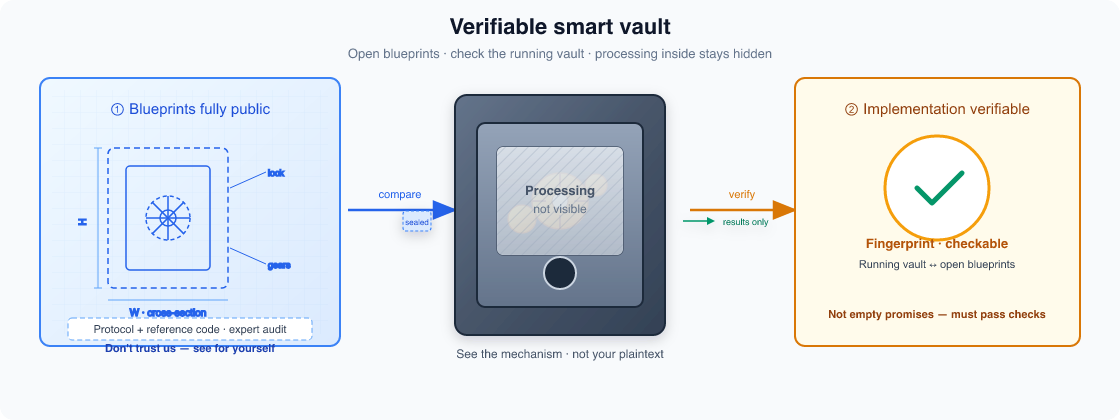
- ① Blueprints fully public — OPE and the Rust inference engine are open source; experts can audit the protocol and reference implementation.
- ② Implementation verifiable — Step 2 below runs in Settings → Verify attestation, checking published manifests and hardware proof so the live vault matches the blueprints.
- See the mechanism, not your plaintext — gears show observable machinery; the frosted “processing not visible” window is your prompt being handled inside the vault without readable exposure to outsiders (including the routing server).
The one-minute mental model
Think of three zones:
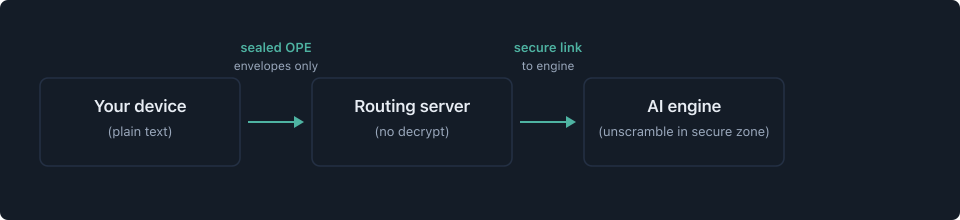
- You see the real prompt; the app locks it with OPE (Open Privacy Envelope).
- The routing server routes, signs you in, meters usage, and forwards — it should not unscramble chat messages.
- The AI engine unscrambles inside a locked-down secure environment to run the model, then locks the reply stream back.
Verification is about proving the engine (and, when enabled, the platform server) matches published fingerprints before you hand it keys.
Step 1 — Open Settings on any client
Path: Settings → Inference → Hosted chat.
You need:
- A signed-in account on a gateway that lists OPE engines.
- Encryption loaded (native module on desktop; in-browser module on web and mobile after a normal app build).
If encryption is unavailable, the panel tells you to rebuild — verification is the same experience everywhere once crypto loads.
Step 2 — Pick an engine and verify
- Choose an engine from the Engine dropdown (for example
engine-prod-1with the model it serves). - Tap Verify attestation.
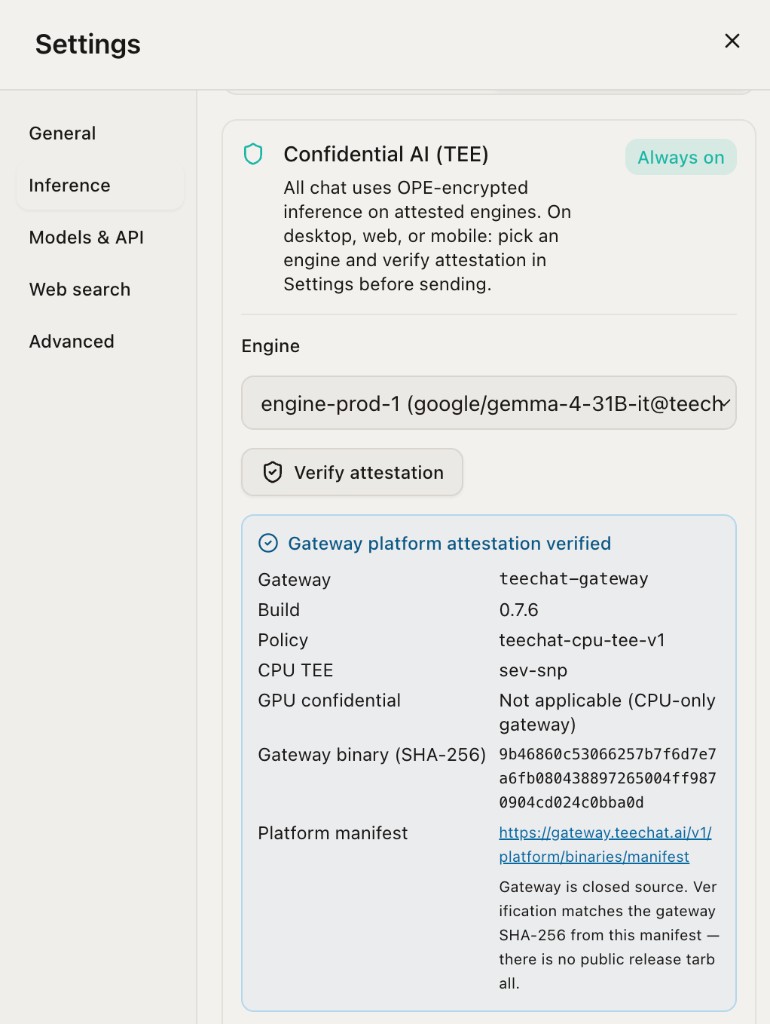
The app contacts the gateway, checks published release fingerprints, and shows what passed. On production today you will typically see two layers. Do not confuse the gateway Build with Engine version — they are separate release trains (screenshot above shows Build 0.7.6 on the routing server; the engine panel below shows Engine version 0.6.23).
Gateway platform attestation (routing server)
The blue Gateway platform attestation verified block is about the routing server (Gateway + Skill Hub), not the GPU inference box. Key fields:
| Field | What it means |
|---|---|
| Gateway | Registered gateway id (e.g. teechat-gateway). |
| Build | Gateway / client release train pinned in our platform manifest (e.g. 0.7.6). This is the version of the routing server binary — not the inference engine. |
| Policy | CPU attestation policy id the gateway must satisfy. |
| CPU TEE | CPU confidential technology for the gateway VM — production uses sev-snp (AMD SEV-SNP). This is hardware-backed proof that the gateway binary runs inside a measured confidential VM, not plain cloud VPS. |
| GPU confidential | Not applicable on the gateway — it is a CPU-only role; GPU confidential compute applies on the inference engine (screenshot below). |
| Gateway binary (SHA-256) | Cryptographic fingerprint of the gateway executable you are routing through. The client compares this hash to the active row in our published platform-binaries manifest (public JSON — paste in a browser or curl). A mismatch fails verification — you are not talking to the release we ship. |
| Platform manifest | Link to the published hash allowlist (GET /v1/platform/binaries/manifest). The gateway is closed source — there is no public release tarball; trust comes from TEE attestation plus manifest hash match. |
This layer protects platform integrity (sessions, engine registry, metering, engine-plane TLS) even though the gateway never unscrambles chat text.
Engine trust (inference server)
After platform checks, the client downloads the selected engine’s trust bundle and validates inference-side evidence. On success you get the green Engine trust verified panel:
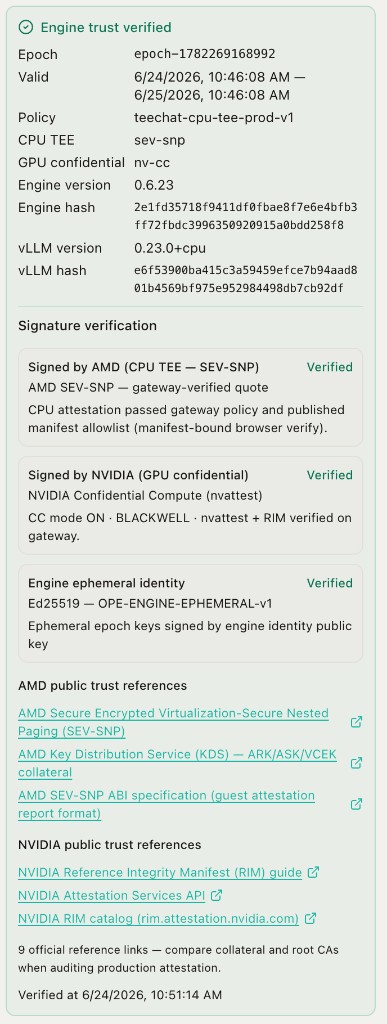
Production attestation surfaces three version numbers — keep them straight:
| Version label | Where you see it | What it tracks |
|---|---|---|
| Build | Gateway panel (above) | Gateway + Skill Hub release train (e.g. 0.7.6). |
| Engine version | Green engine panel (below) | Inference engine release train — the OPE engine tarball we ship to TEE hosts (e.g. 0.6.23). Matched against the platform manifest allowlist in addition to the engine hash. |
| vLLM version | Green engine panel | vLLM runtime inside the TEE (e.g. 0.23.0+cpu), separate from both Build and Engine version. |
| Field | What it means |
|---|---|
| Epoch / Valid | Short-lived encryption key window — send only while this window is active; re-verify when it expires. |
| Policy | Engine CPU attestation policy (e.g. teechat-cpu-tee-prod-v1). |
| CPU TEE | Engine VM confidential CPU — sev-snp on our production metal. |
| GPU confidential | NVIDIA confidential compute on the inference GPU — nv-cc when CC mode and nvattest evidence are live. |
| Engine version | Reported inference engine release train (e.g. 0.6.23 in the screenshot). Independent of gateway Build (0.7.6) and vLLM version (0.23.0+cpu). The client rejects attestation if this string does not match the active manifest row for the measured engine hash. |
| Engine hash | SHA-256 of the OPE inference engine binary running inside the TEE. Matched against the platform manifest allowlist. |
| vLLM version | Reported vLLM runtime version (e.g. 0.23.0+cpu), pinned in the platform manifest and bound in the engine TEE quote. |
| vLLM hash | SHA-256 of the vLLM launcher measured inside the TEE (bin/vllm). Matched against the platform manifest allowlist. |
Signature verification results
Below the hashes, Signature verification summarizes three independent checks:
- Signed by AMD (CPU TEE — SEV-SNP) — The engine’s CPU quote passed gateway policy and matches published manifest measurements (manifest-bound browser verify on production builds).
- Signed by NVIDIA (GPU confidential) — GPU evidence from nvattest + RIM verification on the gateway; you should see CC mode ON and architecture (e.g. Blackwell) when production GPU attestation is enabled.
- Engine ephemeral identity — Ed25519 signature over the current epoch keys used for OPE encryption. Proves the live key window is owned by the engine identity registered at boot.
Public trust references at the bottom link to AMD KDS and the NVIDIA RIM catalog for auditing hardware attestation collateral.
The client:
- Downloads the engine trust bundle (signed proof package from our API).
- Checks CPU secure-hardware evidence (production uses Intel TDX or AMD SEV-SNP class quotes; dev may use test policy).
- Validates engine and vLLM fingerprints (version + launcher hash) against the published platform-binaries manifest (gateway-hosted allowlist).
- Verifies short-lived encryption keys (signed identity over the current key window).
On success, the UI shows policy id, key window, engine version, engine hash, vLLM version, vLLM hash, and signature evidence. The app blocks send if you skip verification or the key window expires.
Platform verification (routing server + Skill Hub)
When platform verification is enabled for your build, Verify attestation also runs the gateway platform check described above (challenge to our API + manifest hash binding). That ties the gateway binary to the published manifest — separate from engine trust, but important for platform integrity.
Why the routing server runs in secure hardware even though it does not read chat
A common question: if the routing server never sees plain text, why put it in secure hardware?
Because the routing server still holds high-value platform state:
| Asset | Risk if tampered |
|---|---|
| Sign-in / session checks | Impersonation, quota bypass |
| Engine registry & trust cache | Routing you to a malicious engine |
| Metering | Billing fraud |
| Engine connection secrets | Man-in-the-middle on engine links |
Production TeeChat places Gateway and Skill Hub in a CPU confidential VM so measurements are bound to known binaries — complementary to OPE, not a substitute for engine-side unscrambling.
Important nuance: Clients today cryptographically verify the inference engine before encrypting. Gateway secure hardware is a platform integrity control; users still rely on HTTPS + optional platform verify for the routing path. We document both layers honestly in our design notes.
What happens when you send a message
- App builds an OPE envelope to the engine’s current keys.
- POST to our chat API with a body that should look opaque under network capture.
- Routing server validates signature, replay rules, quota; forwards to the selected engine over a secure engine link.
- Engine unscrambles inside secure hardware, runs the model (GPU confidential mode in production target), locks response chunks.
- App unscrambles the stream with the session established at send time.
Multi-turn conversations stick to the same engine when possible for speed — affinity is a routing concern, still without plain-text access.
What verification does not claim
- It does not prove the TeeChat app is benign (the app is proprietary). Network audit and scoped pentest address client egress; see our advanced post on Wireshark.
- It does not remove model behavior risks (hallucination, policy filters on decrypted text inside the engine).
- Dev/staging may use test verification policies — production builds should ship manifest-backed policies.
Checklist before you trust a session
- Engine verification succeeded and the key window is still valid.
- Platform verification succeeded (if required by your build).
- You are on the official client build and gateway URL for your region.
- Optional: capture traffic and confirm opaque envelopes (advanced post).
Further reading
- Open protocol: OPE on GitHub
- Engine verification: teechat-inference-engine-rust on GitHub
- Next post: checking out source code for OPE and the engine
- Try it: chat.teechat.ai or download desktop
Verification is not a marketing checkbox — it is how we want confidential AI to work in public: encrypt by default, verify before trust, fail closed when evidence does not match.
Revision log
- Point open-source engine links to teechat-inference-engine-rust (Rust production train).
- Add verifiable smart-vault analogy; tie open blueprints to Settings verification steps.
- Refresh Settings screenshots; clarify gateway Build vs Engine version.